Troubleshooting Switch Packet Loss and MAC Flapping
# Troubleshooting Switch Packet Loss and MAC Flapping
Switch Troubleshooting: Packet Loss and MAC Address Flapping
Introduction
Recently, I encountered a case where a customer reported packet loss issues on their switch network. While STP (Spanning Tree Protocol) packets were transmitting correctly on the inbound port, packets were being lost on the outbound side. This post details the troubleshooting process, diagnosis, and solution for this issue.
Topology
The network structure involves an SBC (Session Border Controller) Host and a container running in ESXi. These transmit SIP packets through a DMZ IRF (Intelligent Resilient Framework) switch, to a firewall, then to an external switch, and finally to a CPE router.

Figure 1: Network Topology showing the path from SBC Host to CPE Router.
Problem Description
The issue manifested as periodic packet loss on the outbound side. Specifically, every 30 seconds, there would be a 5-second window where packets were lost.
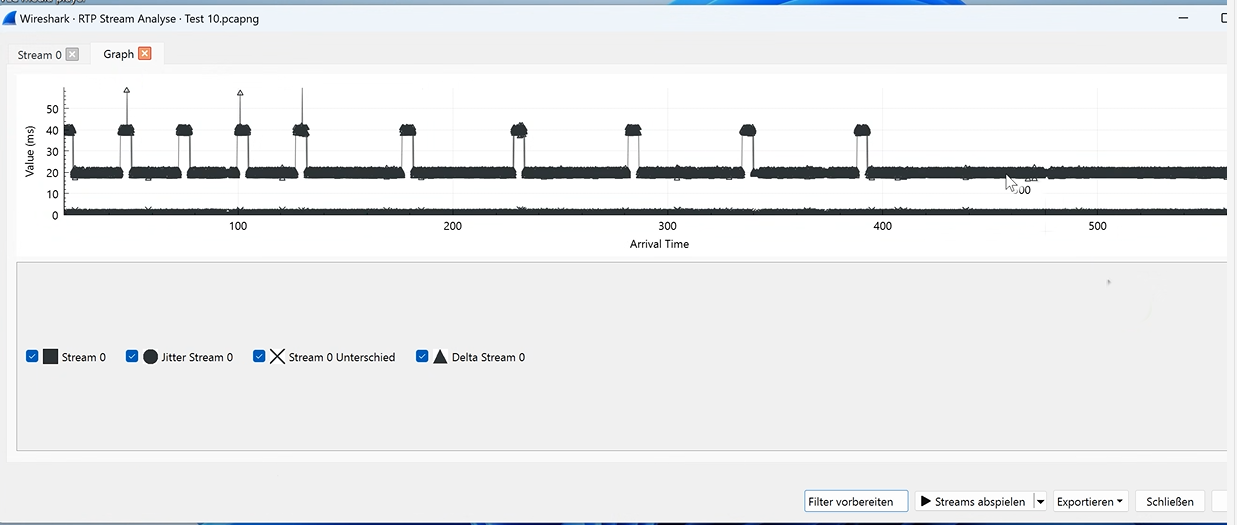
Figure 2: The pattern of packet loss - periodic drops every 30 seconds.
Interestingly, after rebooting the IRF standby switch, the current call would recover when the switch rejoined the IRF fabric. However, the problem would persist for any new calls initiated afterwards.
Diagnosis
Port Configuration
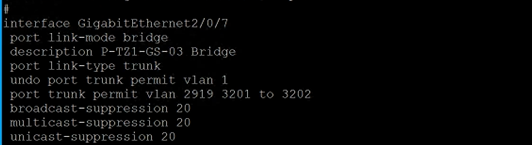
We examined the port configuration for the outbound ports 1/0/7 and 2/0/7. These ports were configured as trunks permitting three VLANs:
- VLAN 2919: Management (MGT)
- VLAN 3201: Emergency Call
- VLAN 3202: Normal Call
QoS and Switch Health
We checked the QoS (Quality of Service) settings for the entire switch and the specific ports. The analysis showed that the overall packet flow within the switch was normal, ruling out congestion or general switch performance issues.
//How to check the Qos
`acl number 3555
rule permit icmp source 192.168.33.108 0 destination 192.168.33.109 0`
rule permit icmp source 192.168.33.109 0 destination 192.168.33.108 0
`//Use classifier track flow
traffic classifier 1 operator and
if-match acl 3555`
`//define flow statistic
traffic behavior 1
accounting p /filter permit //wether accounting p or filter permit`
`//define QOS policy
qos policy 1
classifier 1 behavior 1`
`interface GigabitEthernet1/0/28
qos apply policy 1 inbound
qos apply policy 1 outbound
interface GigabitEthernet1/0/41
qos apply policy 1 inbound
qos apply policy 1 outbound`
Traffic Analysis
The problem was isolated to VLAN 3202.
We performed a Wireshark trace on port 1/0/7. The trace revealed a critical anomaly:
- Source IP:
10.10.13.36
- Destination IP:
100.90.75.44
The packet flow from the same source to the same destination was traversing Layer 2 through two different VLANs:
- VLAN 3202: This is the correct path for the business flow.
- VLAN 2933: This appeared to be a management flow path, which is abnormal for this traffic.

Figure 4: Wireshark trace showing traffic on VLAN 3202 (Business Flow).

Figure 5: Wireshark trace showing traffic leaking to VLAN 2933 (Abnormal Flow).
This behavior suggests that the MAC address was being learned on different VLANs or the traffic was being tagged incorrectly by the uplink device, causing confusion in the switch's forwarding logic (MAC address flapping/instability between VLAN contexts).
Root Cause
The diagnosis confirmed that the issue stemmed from the uplink SBC settings. The SBC was sending traffic destined for the same IP address via two different VLANs (Business VLAN 3202 and Management VLAN 2933), which caused the switch to drop packets due to the inconsistency and potential MAC flapping or security checks.
Solution
To resolve this, we need to ensure strict traffic separation based on the flow type.
- Restrict Management VLAN: Configure the SBC or firewall to only allow management protocols (SSH, HTTP, HTTPS) on the Management VLAN.
- Static Routing: Implement a static route on the SBC to force all traffic destined for
100.90.75.44to go only through VLAN 3202.
By enforcing this path, the ambiguity is removed, and the switch can forward packets consistently without loss.